How to read markup event history
Follow the replies and status changes behind a review decision, then use Current or Ever to find the right items.
Updated
Find the controls
Markups
Right panel → Markups → expand a row
Watch the walkthrough
Before you start
Open a drawing containing markups with replies or status changes. The timeline is available in local PDFs and cloud drawings; shared cloud drawings let collaborators contribute to the same review.
Steps
1. Expand the timeline
- Choose Markups at the top of the right panel—the highlighter icon highlighted below.
- Click the arrow beside the item to expand its timeline.
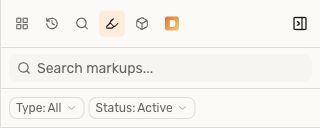
Shown in the cloud viewer. The status and timeline examples below use a local PDF.
Read its events from top to bottom:
- Opened identifies the start of the thread.
- Reply contains a reviewer's message.
- Accepted, Rejected, Completed, Cancelled, and Reopened record status changes.
Each entry shows its date and time, with the author and role when available. For a comment attached to a markup, expand that comment's own thread.
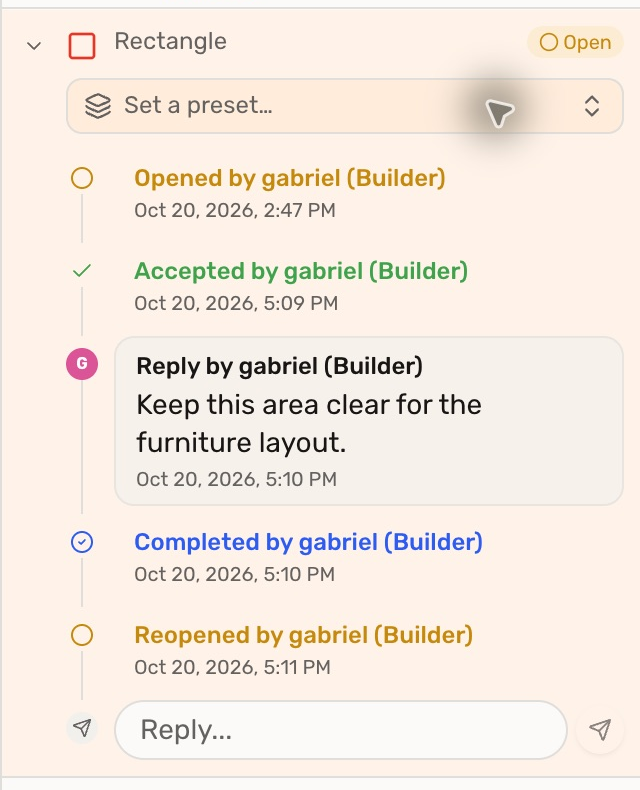
Here the badge is Open, but the timeline explains that the item was accepted, completed, then reopened. The badge is the current state; earlier events explain how it got there.
2. Find current or past decisions
Open the Status filter. Status choices are checkboxes: clear unwanted choices when you want one status only.
- Current → Completed finds items that are completed now.
- Ever → Completed also finds items that were completed earlier and later reopened.
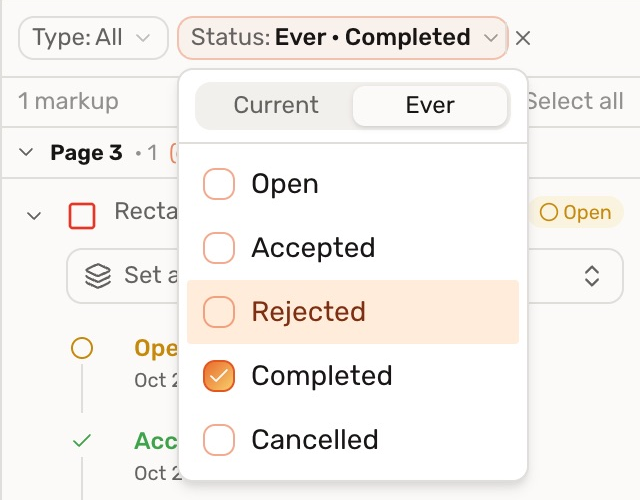
Switching between Current and Ever changes the results without changing any markup's status.
3. Add context to the record
Use Reply… to explain a decision or what still needs work, then press Enter. For a local PDF, click Save to keep your changes in the file.
This timeline records the review conversation and status events. It is not a replay of every move, resize, or colour edit to a markup.
Check your result
An item that was completed and reopened appears under Ever → Completed, with both events still visible in its timeline.
Troubleshooting
- An older decision is missing from the results: select Ever, and check the chosen status, search text, and other filters.
- You see only the row: click its expand arrow; attached comments have their own threads.