How to turn takeoffs into stock quantities
Use product coverage to convert measured quantities into whole purchased units.
Updated
Find the controls
Stock ordering
Formula column → order(Takeoff, Coverage)
Before you start
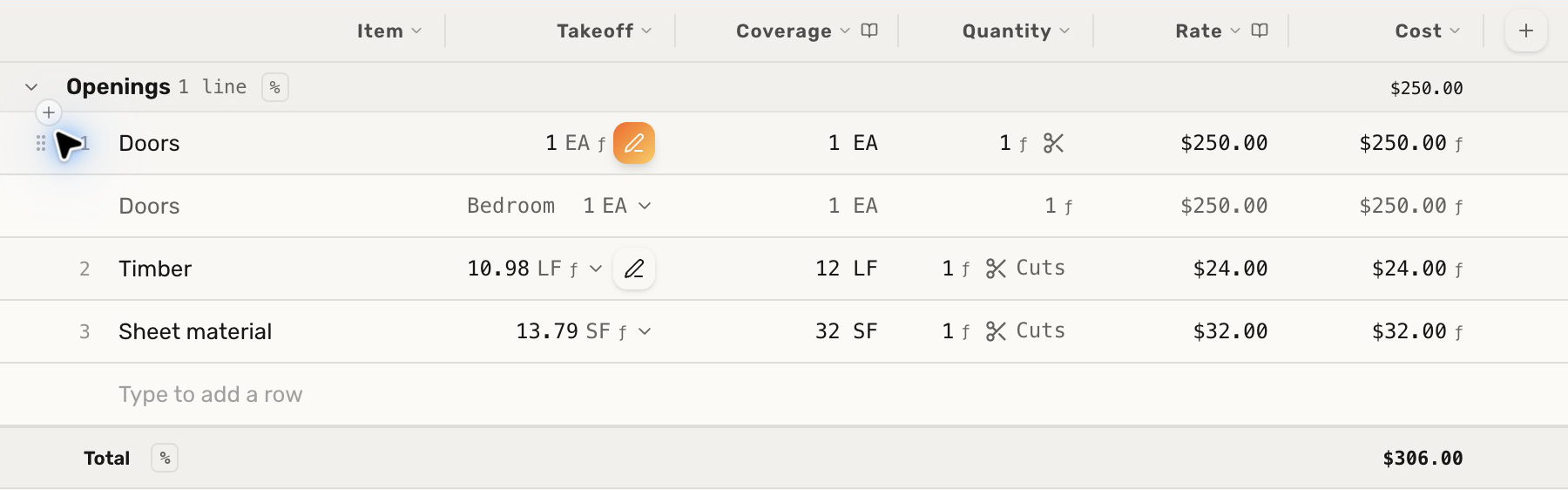
Create a takeoff table and link its material rows to a product library. Each product needs Coverage: the amount supplied by one purchased unit, with compatible units.
For example, one 12-foot timber supplies 12 LF; one 4 × 8-foot sheet supplies 32 SF.
Steps
- Use a Takeoff column for the measured amount and a Library column named Coverage for the product's coverage. Select its unit field if units are stored separately.
- Add a
 Formula column named Quantity and enter
 order(Takeoff, Coverage). - Select the library product for each row. With Round Takeoff ÷ Coverage, Deta divides the takeoff by the coverage and rounds up to whole purchased units.
- To price the order, add a Library column named Rate for the price of one purchased unit, then a Formula column named Cost using
Quantity * Rate.
Check your result
A takeoff of 25 LF with 12 LF per purchased length produces 3 units. At $24 per length, the cost is $72.
Bulk rounding uses the combined amount. It does not check whether individual pieces fit. Use length cutting or sheet cutting when piece sizes matter.
Troubleshooting
- The order cannot calculate: make sure coverage is positive and its units match the takeoff.
- A total mixes feet and square feet: turn off sums into Total for the mixed-unit Takeoff column. Total the cost column instead.
- Enough total material still cannot fit the pieces: switch from bulk rounding to the appropriate cutting mode.