How to filter takeoff quantities
Choose which branches a table reads, then narrow a quantity by page, preset, or field value.
Updated
Find the controls
Branch selection
Above the table → branch selector
Before you start
Create a takeoff table with a live quantity such as count(door). A table belongs to one drawing version; branch choices refer to that version.
Steps
Choose the branches
- Open the
 selector above the table, beside Table actions.
 - Select Every branch in this version, or select the specific branches to include. For a separate design option, include only that option’s branch.
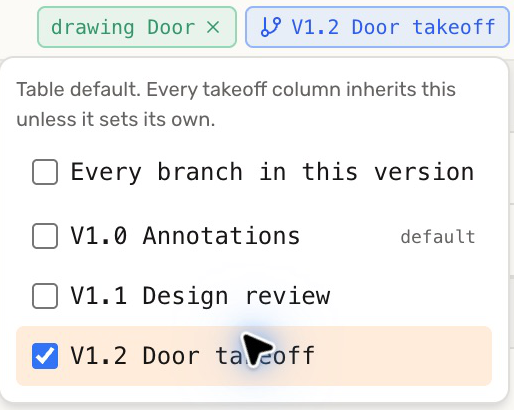
This is the table’s default. A Takeoff column can override it in the column heading’s editor, and a cell can override it through its right-click menu. Check these overrides if one quantity behaves differently.
Filter a page or field
- Double-click the quantity cell to edit its formula.
- Add conditions inside the parentheses, joined with
&, then press Enter.
| Include | Formula |
|---|---|
| All Door marks in the chosen branches | count(door) |
| Door marks on page 1 | count(door & page=1) |
| Doors whose Location is Bedroom | count(door & Location=Bedroom) |
| Bedroom doors on page 1 | count(door & Location=Bedroom & page=1) |
Use the page number shown in the viewer. Field names and text values are case-sensitive; copy Location and Bedroom exactly from the markup.
Use another version
Open  Versions and open a table under the version you want to measure. To reuse an existing table there, choose Copy to version… from its
  Table actions menu. The destination version supplies its own markups.
Check your result
In the example, three Door marks give 3 EA. Two have Location set to Bedroom, so count(door & Location=Bedroom) gives 2 EA.
Troubleshooting
- The total includes another design option: check the table’s branch selector and any column or cell overrides.
- A field filter returns zero: check the value and its capitalization. A tag is written as a bare name, such as
count(door & interior), rather thantag=interior.