How to issue a dated drawing copy
Keep a fixed PDF of a cloud drawing and its markups, dated and recorded in the version tree.
Updated
Find the controls
Issue
Viewer header → Export / Print → Issue
Watch the walkthrough
Before you start
Open a cloud drawing as its owner or a workspace member with edit access. Select the version and branch you want to issue.
Issue includes the drawing’s markups and flattens them into the PDF. Comments and their attachments are omitted. If you need a signature or stamp, place it on the drawing first; Issue does not add one.
Steps
- Open
 Export / Print in the viewer header.
 - Click
 Issue. This starts immediately, without a settings dialog.
 - Deta downloads the PDF and opens
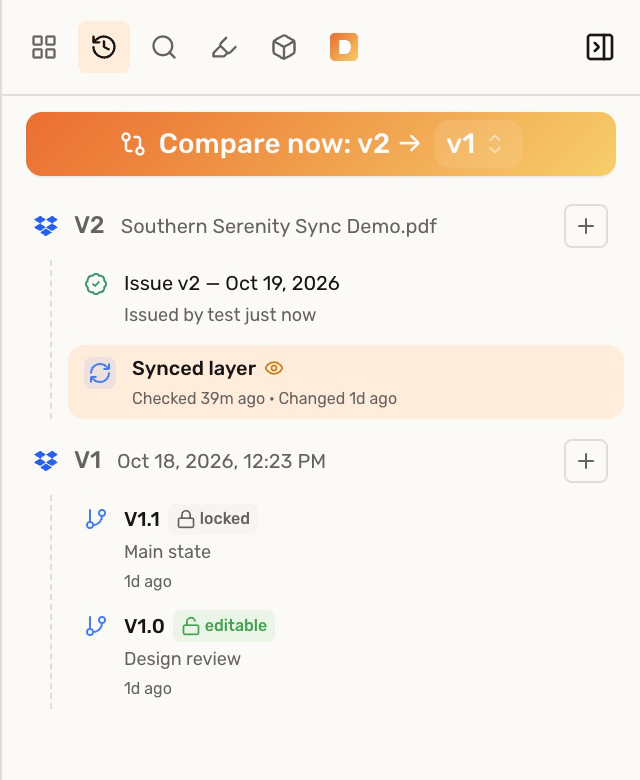
 Versions, where the dated issued record appears under the source version.
Open an issued copy again
Click the dated record to view the locked PDF. Use Download in that viewer, or the record’s  More actions → Download menu, to download the same copy again. When a version has several issues, expand Issued records first.
Dropbox and Google Drive drawings
Deta also saves a separate dated PDF beside the connected source file. The working source is not overwritten, and issuing does not create another drawing version. The issued record includes an  link to the copy in the drive.
Check your result
The dated record stays fixed when you continue editing the drawing. To deliver a later state, issue again; Deta adds another record.
Troubleshooting
- Issue is missing: it is unavailable for local files, read-only drawings, and drawings opened as an external share recipient or guest. Use Export PDF to download a copy.
- Saving a copy to the drive failed: the issue can still complete in Deta. Download it from the issued record; the warning concerns the additional Dropbox or Google Drive copy.