How to export a PDF
Download your drawing with the markups, comments, and attachments you choose.
Updated
Find the controls
Export PDF
Viewer header → Export / Print → Export PDF
Watch the walkthrough
Before you start
Open the drawing you want to export. For a cloud drawing, select the version and branch you want included.
Steps
- Click
 Export / Print in the viewer header.
 - To choose what to include, click the
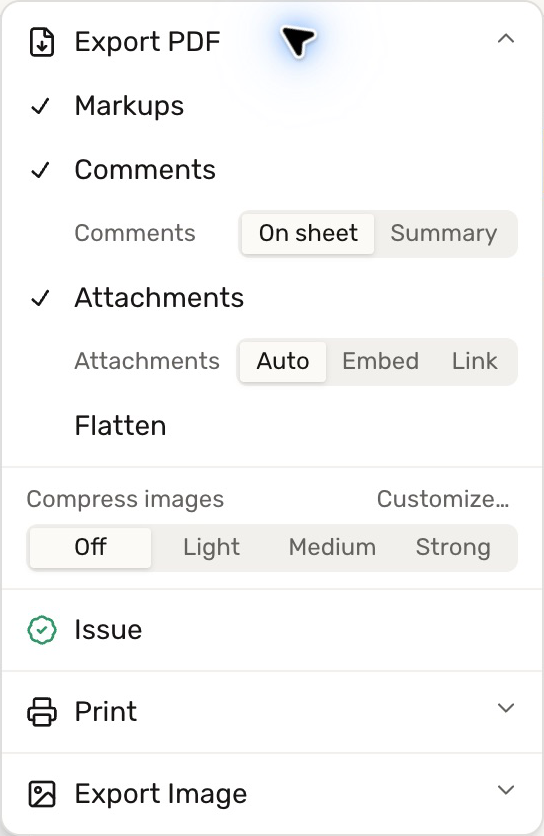
 chevron beside Export PDF. Leave Markups checked to include your annotations.
 - Choose the options below if needed, then click
 Export PDF to download the file.
Markups and flattening
With Flatten off, ordinary markups remain PDF annotations that compatible viewers can edit. Turn Flatten on to make them part of the exported page content. This affects the downloaded copy; your markups remain editable in Deta.
Signatures and stamps are always burned into the exported page when included, even with Flatten off.
Comments and attachments
Check Comments, then choose On sheet for PDF comment notes or Summary for numbered markers and an appended comment list.
Check Attachments to include files attached to comments:
- Auto: embeds the files, switching to download links for large attachment totals.
- Embed: includes the attachment files inside the PDF.
- Link: includes download links. Anyone with the exported PDF can use those links.
File size and selected pages
Use Compress images for a smaller download. Export PDF exports the whole document; use Extract pages to download a selection with these same export settings.
Check your result
The PDF downloads to your computer. Exporting does not replace the working PDF in Deta, Dropbox, or Google Drive.
Troubleshooting
- Markups or comments are missing: check their separate options before exporting again.
- A recipient cannot see PDF comment notes: choose Comments → Summary to include a readable comment list.
- An attachment was unavailable: the export can finish without that file. The attachment remains on the drawing; retry when it is available.