How to measure circumference on a PDF
Draw a circle over a round feature, enable Measure mode, and select it. The selection readout shows its circumference as Length.
Updated
Find the tool
CircleU
Left toolbar → Rectangle flyout → Circle
Before you start
Set or calibrate the page scale. Circumference is the distance around a circle. You need permission to add markups.
This is a selection info workflow: draw or select a shape, enable Measure, and read its calculated values.
Steps
- Press U to select Circle. You can also press and hold (or right-click) Rectangle in the left toolbar, then choose Circle from its flyout.
- Drag a circle to fit the round feature on the drawing. A normal drag keeps it circular; hold Shift while dragging to draw an oval instead.
- Open Snap & measure options in the bottom viewer bar and turn on Measure. The keyboard shortcut is F4; some keyboards require Fn + F4.
- Switch to Select (V) and select only the circle you want to measure.
- Read Length in the selection readout above the bottom viewer bar. For a circle, this is its circumference. Area is the space inside it.
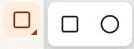
Circle shares a toolbar slot with Rectangle.
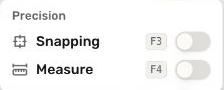
Turn on Measure to see length and area for selected shapes.
Check your result
A circle with a diameter of 2 m has a circumference of approximately 6.28 m and an area of approximately 3.14 m². Check the shape's fit and the page scale before using its result.
For an oval, Deta calculates the ellipse's area and an approximation of its circumference. The readout measures the curve, not its surrounding rectangle.
Troubleshooting
- No selection readout appears: enable Measure and select the circle on the current page.
- The number is unexpectedly large: select just one shape. With multiple measurable shapes selected, the readout adds their lengths and areas.
- The outline is an oval: draw without Shift for a circle, or correct the shape's dimensions before measuring.